
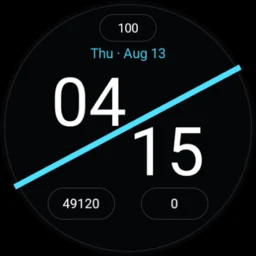
Diagonal Stats
Facet Sprite
A modern Wear OS Watch Face Format rebuild of Diagonal Stats with three configurable complication slots, restrained ambient rendering, customizable accents, and a resource-only runtime.
- Wear OS
- Standalone
Card stats
- Platform
- Wear OS
- Phone required?
- No
- Standalone?
- Yes
- Account required?
- No
- Network
- Diagonal Stats itself has no network client; complication content is provided by Wear OS and the complication providers the user selects.
What can Diagonal Stats help with?
- Use a Wear OS watch face with three configurable complication slots for glanceable stats
- Choose complication data such as watch battery, steps, or unread notifications and customize the accent
- Run a resource-only Watch Face Format design without app-owned background services, analytics, or networking
Key Features
- Preserve the historical package identity while rebuilding the watch face with Google Watch Face Format
- Use three configurable complication slots with watch battery, steps, and unread notifications as the default stat layout
- Offer seven accent choices plus optional date and seconds, with seconds disabled by default
- Render only essential hour/minute time in ambient mode to reduce unnecessary pixel activity
- Remain resource-only with no DEX payload, runtime libraries, analytics SDK, networking stack, background service, polling loop, wake lock, or sensor listener owned by the package
- Target Wear OS 4+ with the repository baseline of minSdk 33, targetSdk 35, compileSdk 36, AGP 9.3.1, Gradle 9.7.0, and JDK 17
- Current Google Play release uses the resource-only Watch Face Format build with version 2.1.2 and the preserved historical package identity
Frequently asked questions
Does Diagonal Stats run background code?
The current rebuild is a resource-only Watch Face Format app with android:hasCode=false. Its repository contains no app-owned service, polling loop, WorkManager job, sensor listener, analytics SDK, or networking stack.
Can I change the stats shown on the watch face?
Yes. The three complication slots are user-configurable and support the documented SHORT_TEXT, MONOCHROMATIC_IMAGE, and EMPTY complication types.
Is Diagonal Stats available on Google Play?
Yes. The current resource-only Watch Face Format build is now available through the existing Diagonal Stats Google Play package.
Add Facet Sprite to your collection
One tap from Google Play.
Help & feedback
Report a problem, suggest an improvement, or contact the developer about Diagonal Stats. No GitHub account is required.
Learn how this Wear OS app fits the workflow
Use the focused guide when you want the practical workflow, or explore related Wear OS apps for the same type of task.
Browse all Wear OS apps